
Machine upkeep and downtime
Find the machines costing you most
Log every breakdown and stop. Problem machines become obvious and easy to fix.
What this costs while it stays invisible.
- A machine stops and the operator goes looking for a mechanic. Hours pass.
- Downtime is never logged, so a problem machine hides behind shift excuses.
- Oiling, filters and blade sharpening happen only after a costly breakdown.
- You think one old machine eats profit, but have no data to replace it.
- Quick fixes with no cause logged. The same fault returns every fortnight.


What changes when the floor can be trusted.
- Operators report a mechanical, electrical or material stop in two taps.
- Every repair, spare part and service hour is logged on that machine.
- Service tickets raise themselves by date or by stroke count.
- Stop minutes add up per machine live, and capacity updates on the schedule.
- A Pareto report ranks causes and repair costs, and names the worst machine.
How it works
Step by step on the floor.
- 1The operator flags a breakdown on the tablet
- 2Maintenance gets the machine code and fault type at once
- 3Technicians repair, log parts and record the cause
- 4Downtime adds to the machine's record
Inside the Software
Real application screens. Not concept mockups.
Here is the actual interface your machine minders and plant leadership interact with every day, captured directly from running production setups.
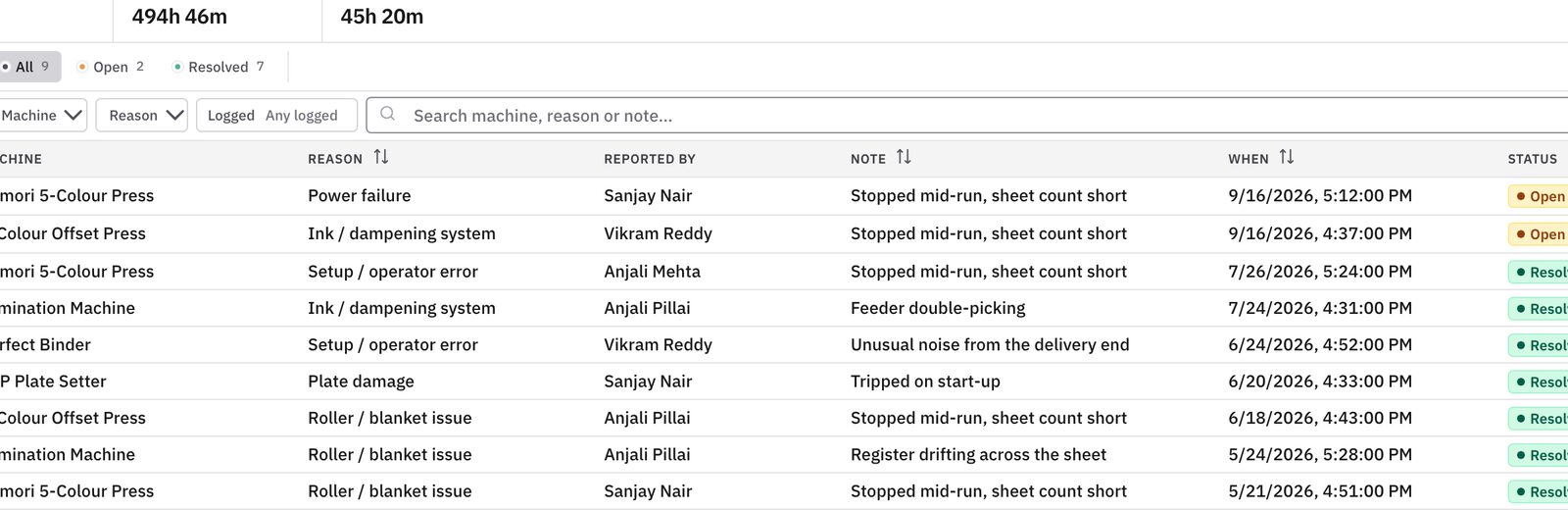
Every breakdown with machine, reason and status. Repairs are tracked, not forgotten.
- Open breakdowns by machine and severity
- Cause logged for every stop
- Repeat failures show up fast
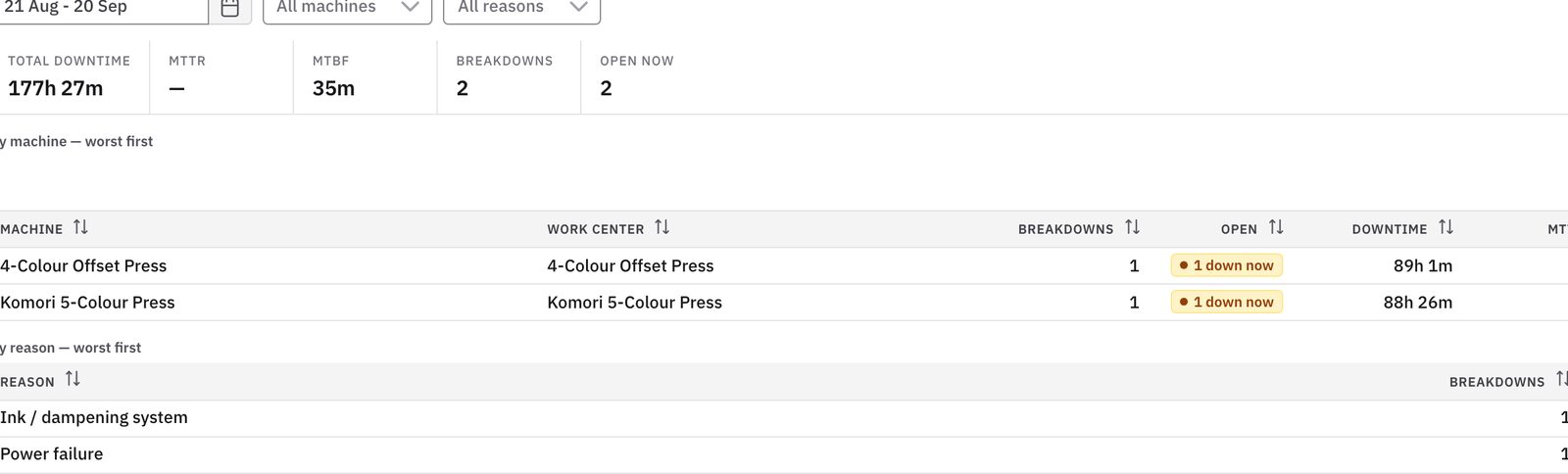
Downtime totalled by machine and cause. Lost hours become a number you can fix.
- Downtime ranked by machine and reason
- Planned and unplanned stops kept apart
- Shows the machines that cost you most
Keep exploring
Works with
Questions you should ask before buying any system.
Does the operator have to switch apps to report a breakdown?
No. It is on the normal floor screen. Tap the red 'Machine Stoppage' button, pick electrical, mechanical or tooling, and maintenance is alerted.
How does downtime affect our capacity planning?
Mark a machine halted and the schedule updates at once. Its jobs are flagged at risk, so managers can move urgent work to another line.
Can we track spare part and consumable costs used in repairs?
Yes. Technicians log bearings, belts, heaters and oils against the repair. You see each machine's total upkeep cost over its life.
You should not need to spend your life walking the floor to discover the truth.
Bring us one problematic production order, one chronic bottleneck, or one metric nobody trusts. In thirty minutes, we will show you how Prodman restores order and calm, without asking your machine operators to become clerical typists.
Limited on-site implementations each quarter · Configured by hand